
Check the audit trail
Find who did what and when, see what changed, and export the records as CSV.
The audit trail records every decision and run in the workspace: databases and masked copies, masking policies, schedules, masking rules, runs, members, AWS accounts, API keys and the subscription. Every member of the workspace can see it.
Find a record
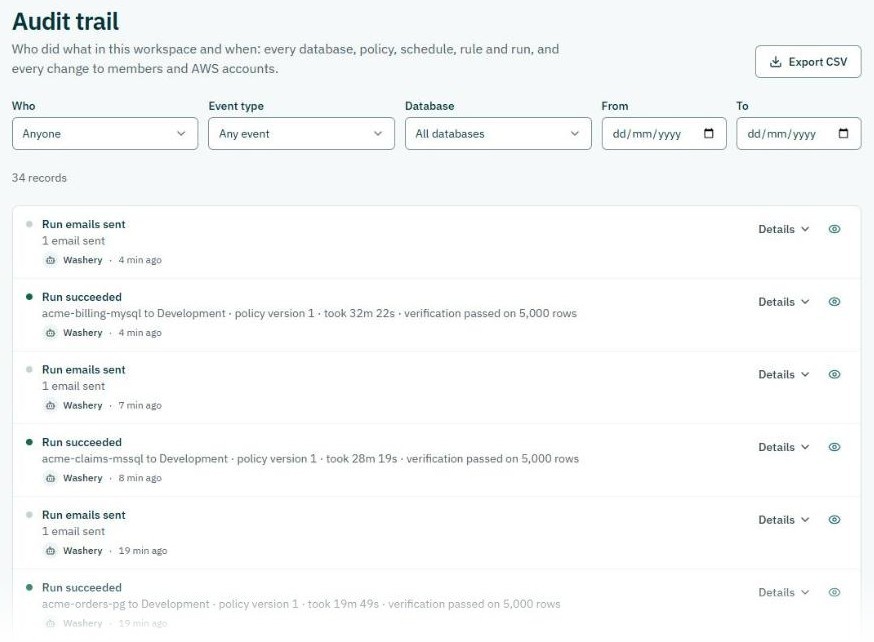
- Open Audit trail in the sidebar. The newest records are first.
- Narrow it with Who, Event type, Database, From and To.
- Choose Details on a record to see what changed, with the value before and after. A run also shows its steps.
- Choose the view icon to open what the record is about, such as the run, the masking policy or the database.
Who did it
A person is shown by their current name, and someone who has left the workspace as Former member. Anything nobody did by hand shows as Schedule, Infra Lens, API or Washery, for example a scheduled run or the emails Washery sends when a run ends.
Export
Choose Export CSV to download the records that match your filters. An export holds up to the newest 10,000 records, so narrow the dates to export the rest.
Still stuck
Tell us what you were doing and what you saw.